


Business process automation means software and technology take over the recurring steps of a process: moving data, creating invoices, routing approvals, sending confirmations. It works best in a fixed order: map the process, measure how it performs today, improve it, only then automate it, and measure again. Skip the first three steps and you mostly automate the mistakes that were already in there.
Monday, retyping purchase invoices. Wednesday, pulling hours together from three systems. Friday, a weekly overview that is only right after two rounds of questions.
Sound familiar?
That work feels like the problem, so automation looks like the answer. Yet the manual work is usually a symptom. People retype because two systems don’t talk to each other, and they chase answers because nobody agreed which version is leading. Automate the process as it runs today and you don’t make the process better, you just make the detour faster.
That is why process automation starts with the foundation: a process that is right, with an owner and an outcome you can measure. Tom and Hubert-Jan, the founders of Optilise, both spent a considerable time at iPM Partners. There they learned a great deal about process optimisation, process modelling, process design and automation, with performance management as the common thread: an improvement only counts if you can show what it delivers. With the rise of AI, process automation is also becoming more and more accessible, which means we can do more and more for our clients in this area.
Below you’ll read what process automation is, which processes lend themselves to it and how to approach it in six steps. You’ll also read two things most explanations leave out: how to model and improve a process before you automate it, and which figures prove that it actually paid off.
What is process automation?
Process automation means letting software and technology, rather than people, carry out the recurring steps of a business process. A business process is the fixed sequence of steps from a trigger to a result: from incoming order to paid invoice, from signed contract to a new colleague with a working account.
There are roughly four ways to automate such a process, and they differ in what they can handle:
- Workflows in your existing systems. Your ERP, accounting or HR package routes a task, asks for an approval or sends a confirmation as soon as a step is done. This is the cheapest route, and you often have it already.
- Integrations and integration tools. With Power Automate, Zapier or Make you let data flow between systems from different vendors, for example from your web shop to your accounting.
- Robotic process automation (RPA). A software robot copies an employee’s clicks and keystrokes in a system that has no integration. It works, but it breaks as soon as the screen changes.
- AI workflows. A workflow in which an AI model performs a step a person used to do: reading an invoice or email, assessing its content and passing the result on to the next step. That lets the process continue with input that can’t be captured in fixed rules.
The first three follow fixed rules: if this happens, do that. AI workflows go a step further, and what that means in practice you’ll read further on.
What automation delivers is more than time. An automated step runs the same way every time, forgets nothing and doesn’t wait for someone to come back from holiday. Errors and lead time drop together, and your people keep time for the work that needs judgement.
Which processes can you automate?

A process lends itself to automation if it happens often, follows the same steps every time, starts from digital data and has a clear end point. In small and mid-sized companies the candidates are almost always the same:
- Purchase invoice processing. Reading, matching against the order, coding and preparing for payment.
- Invoicing and collections. Creating invoices from orders or hours, and sending a reminder automatically once the payment term has passed.
- Order processing. From incoming order to planning, stock and delivery, without anyone retyping anything.
- Hours and payroll. Approving logged hours and passing them on to invoicing and payroll.
- Onboarding and offboarding. Contract, accounts, hardware and access rights sorted in one go.
- Customer communication. Order confirmations, status updates and reminders that go out as soon as a step in your system is completed.
- Reporting. Combining figures from several sources into one overview. In Power BI that becomes a scheduled refresh instead of a monthly afternoon in Excel.
And that list is getting longer. Until recently a step dropped out as soon as someone was needed to read or assess something: a PDF invoice in an unusual layout, a customer question in an email, a form that was half filled in by hand. With what AI can do, software increasingly handles that itself, so you can also automate processes that used to stay manual. Optimising them is becoming accessible to more and more organisations, not just companies with their own IT department. How that works and where the limits are, you’ll read further on. Want to know what it could mean for your processes? We’re happy to think along, get in touch.
A useful rule of thumb: if a task comes back several times a week and everyone does it the same way, it is a candidate. If every colleague does it their own way, it isn’t yet. You first need to agree how it should be done.
Some steps should stay with a person. Whether a new customer may buy on credit, how to respond to a complaint, which customer goes first when stock is tight: those are trade-offs, not rules. Software can prepare such a decision by putting the data ready, but the decision itself stays with someone who has the overview.
Improve first, then automate
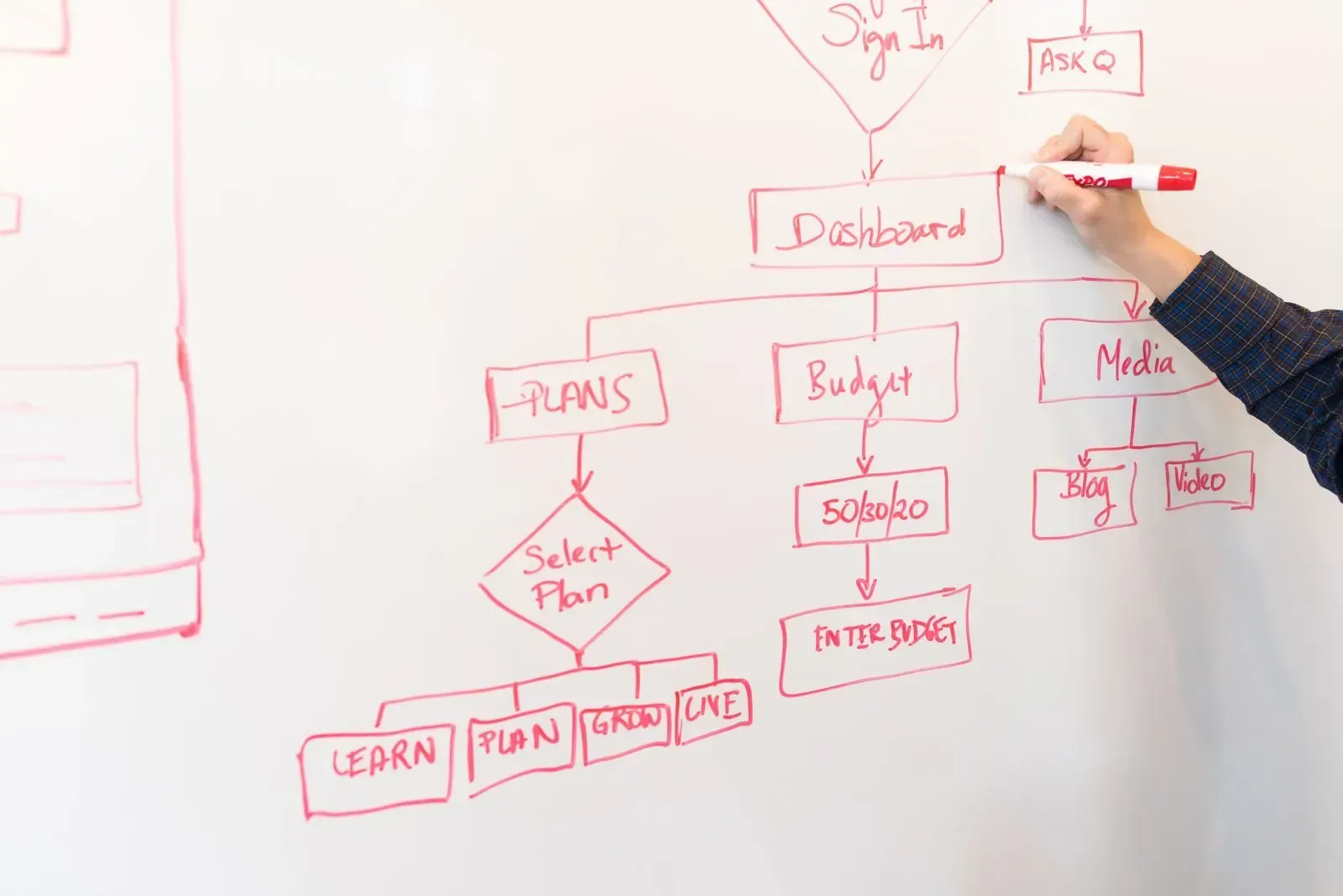
The most common mistake in process automation isn’t picking the wrong tool, it’s rebuilding the current process one to one. A process that has run for years has collected detours: a check that was once needed and now happens twice, an Excel list that exists because the system lacks one field, an approval by someone who moved to another role long ago. Automate that and you have a messy process that now also works the night shift.
So you model the process first. You draw it the way it really runs today, the so-called as-is situation: every step, who performs it, which system is involved and where people wait. The common notation for this is BPMN, the international standard for process models, but in a first session a whiteboard with sticky notes does the same job. What matters is the conversation with the people who run the process, not the notation.
Such a drawing almost always produces three kinds of improvements: steps that can go, steps that can move to another moment or another role, and errors that are better fixed at the source than afterwards. What remains after that, the to-be situation, is the process you automate.
This is the work that Tom and Hubert-Jan’s background at iPM Partners is about: setting up processes so they become measurable, then improving them step by step. In that order, automation is the last step, not the first.
What is process mining?
Process mining is a technique that reconstructs how a process actually runs from the data your systems already record. Every time someone creates, approves or invoices an order, the system writes a line with a case number, the activity and a timestamp. Process mining puts those lines in sequence and shows which routes an order really takes, how long each step lasts and where it gets stuck.
A model shows how people think the process runs, process mining shows how it really runs. The two are often further apart than anyone expects.
Is it for you? Process mining pays off mainly at volume: thousands of orders, invoices or tickets a month, recorded in one system with reliable timestamps. Microsoft offers it as part of Power Automate, and the large ERP vendors have similar features.
For a mid-sized company with a few hundred orders a month, an afternoon of mapping with the people who do the work usually delivers more. They also know why a step gets skipped, and that is in no log file.
Measure the process before and after automation

Without a figure chosen in advance, every automation ends with the feeling that things are faster, and that feeling convinces nobody in a budget meeting. An automation only succeeds when a figure chosen in advance demonstrably improves. That takes a baseline up front.
For processes, these are the KPIs that tell you the most:
- Lead time. The time from trigger to result, for example from receiving an invoice to paying it.
- Waiting time. The part of the lead time in which nobody does anything. It is usually the largest part, and exactly what automation removes.
- First time right. The share of cases that go through the process in one go, without correction or being sent back.
- Manual touches per case. How often a person has to handle, retype or approve something.
- Exceptions. The share of cases that fall outside the standard route. If it is high, simplify the process first.
- Cost per case. Hours spent times the hourly rate, divided by the number of cases handled.
Pick two or three, record the current value and agree which value you want to see after three months. How to set up such KPIs with a formula, a source and a target is covered in our article with KPI examples.
This is where process automation and business intelligence meet. An automated process records every step, and that data is the source for a dashboard that shows whether the process does what you expect. In a management dashboard you then see not just revenue, but also whether the order flow behind it runs smoothly.
Business process automation in six steps
- Map your processes. Which tasks come back daily or weekly, who does them, how long do they take and where do they go wrong? The people who do the work every day can tell you in a single session.
- Pick one process. If you want to automate a business process, take the one that costs the most time or produces the most errors, and whose steps are already fairly fixed. Tackle five processes at once and after six months you have five half-finished solutions.
- Measure and improve it. Take the baseline, draw the process, cut what is redundant and agree how it should run.
- Choose the solution. Start with what you have: can your ERP or accounting package do it with a standard workflow? If not, an integration tool between the systems. Custom software only if the process is truly your own and has to last.
- Start small and bring your team along. Build a first version, test it with the people who run the process and improve it on their feedback. They know where the exceptions are. Without their trust, someone will keep the old Excel list going next to the new system.
- Measure again and maintain. Compare the figures with the baseline. Also plan for maintenance: systems get updates, integrations change and your process grows with your organisation.
What AI changes about process automation
Until recently you could only automate what fitted into fixed rules. A structured order from a web shop was fine. A PDF invoice that every supplier formats differently, or a customer email with three questions mixed together, needed a person to look at it.
With the rise of AI, exactly that part becomes automatable. Language models and document recognition read unstructured input and turn it into data a workflow can continue with:
- Reading incoming invoices and forms and putting the data in the right fields.
- Classifying emails and routing them to the right person or process.
- Answering customer questions based on your own documentation.
- Flagging deviations that don’t fit a fixed rule.
That makes process automation a lot more accessible, including for smaller organisations. Statistics Netherlands (CBS) sees it in the figures (in Dutch): in 2025, 33 percent of Dutch companies with ten or more employees used one or more AI technologies, against 23 percent in 2024 and 14 percent in 2023. For us it means we can do more and more for clients beyond designing and measuring the process. Steps that used to stay manual are now within reach too.
One thing AI doesn’t change. A model works with the data it is given and repeats the errors in it, only faster. A process with duplicate suppliers or outdated item codes doesn’t get better with AI. Data quality and a clear process model remain the precondition.
When you don’t need a partner for this
Not every automation question calls for a project. Does your process run entirely within one package, such as AFAS or Exact, and does that package have a standard workflow for exactly that process? Then switch it on yourself. The vendor has documentation for it.
The same goes for a single integration between two widely used systems, such as a web shop and an accounting package. There is usually a ready-made connector for that which you can set up yourself.
A partner only makes sense when the process runs across several systems, when nobody knows exactly how it runs today, or when you want to be able to show what the automation delivered. Then the value isn’t in the integration itself, but in the modelling, improving and measuring around it.
So which is it for you: are you automating the process as it runs today, or as it should run? Want to know which process at your company qualifies first? Get in touch.
Frequently asked questions
What is process automation?
Process automation means letting software and technology, rather than people, carry out the recurring steps of a business process. Think of creating invoices, moving data between systems, routing approvals and sending confirmations. The software follows fixed rules or, with AI, also handles unstructured input such as PDFs and emails.
Which business processes can you automate?
Processes that happen often, follow the same steps every time, start from digital data and have a clear end point. In small and mid-sized companies that usually means purchase invoice processing, invoicing and collections, order processing, hours and payroll, onboarding and offboarding, customer communication and reporting.
What does business process automation deliver?
Less manual work, fewer errors and shorter lead times, because an automated step runs the same way every time without waiting. How much it delivers you only know if you take a baseline beforehand on figures such as lead time, first time right and manual touches per case.
What is the difference between workflows, RPA and AI?
A workflow routes tasks inside your existing systems. RPA lets a software robot copy an employee's clicks in a system that has no integration. Both follow fixed rules. AI adds the ability to handle unstructured input, such as invoices in varying layouts or customer emails in free text.
What is process mining?
Process mining reconstructs how a process actually runs from the events your systems already record: per case, which activity happened when. It shows which routes cases really take, how long each step lasts and where things get stuck. It pays off mainly with thousands of cases a month in a single system.
Should you improve a process before you automate it?
Yes. Automating the current process as it is also rebuilds its detours, duplicate checks and unnecessary approvals. Map the process the way it really runs first, cut what is redundant and agree how it should run. Then automate that improved process.
What is the biggest mistake in process automation?
Automating a process that is not right yet, with a close second: taking on too many processes at once. Start with one process that costs a lot of time or produces a lot of errors, improve it, measure it and only expand once that first step has demonstrably paid off.
Can you automate business processes with AI?
Increasingly, yes. AI can read invoices and forms, classify and route emails and answer questions based on your own documentation. That makes automation accessible for steps that used to require manual work. The precondition stays the same: a clear process and reliable data.
